
Achook ItemGuard — interactive demo
 RequesterCreate a governed itemSimulated environment · sample data
One item, built from parameters
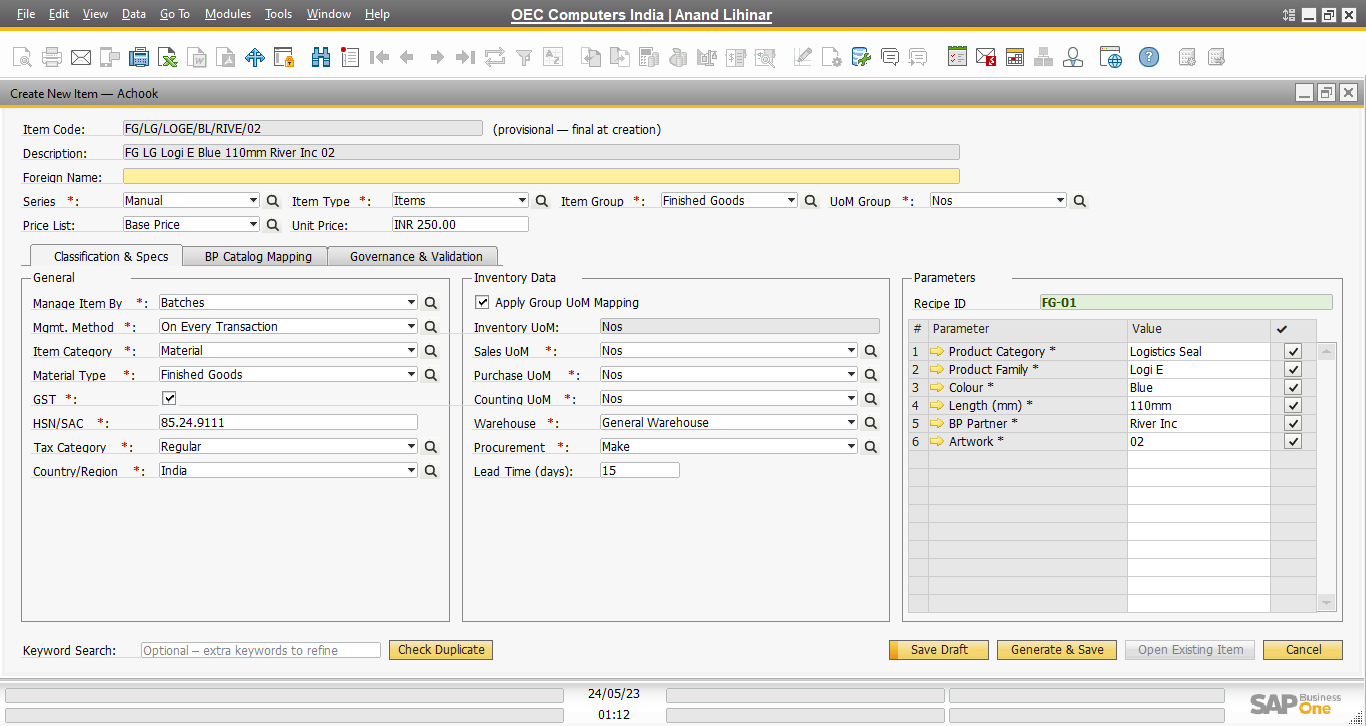
Recipe ID FG-01 lists the parameters: Logistics Seal, Logi E, Blue, 110mm, River Inc, artwork 02. The item code FG/LG/LOGE/BL/RIVE/02 and its description are generated from them.
The code is provisional until the item is created, so two people can never reserve the same final code by accident.
One item, built from parameters
Recipe ID FG-01 lists the parameters: Logistics Seal, Logi E, Blue, 110mm, River Inc, artwork 02. The item code FG/LG/LOGE/BL/RIVE/02 and its description are generated from them.
The code is provisional until the item is created, so two people can never reserve the same final code by accident.
Every screen is SAP Business One with the add-on, from the demo company OEC Computers India. Only the brand name reads Achook. System messages and status-bar messages are the add-on’s own wording and appear only after the action that causes them. Use Guided for a step-by-step tour, or Explore yourself to click through freely.