

Complete traceability from supplier to customer
Serial and batch numbers are allocated, governed and traced with SAP Business One’s standard batch mechanism. When a recall, complaint or audit comes in, genealogy and recall analysis answer it on screen, from goods receipt to delivery.
Capabilities
Allocation Workbench
Simulate allocation for a document or by item, by warehouse or across warehouses, with branch and location filters, before anything is posted.
Serial & Batch Governance
Find batches by expiry condition, SAP and QC status or certificate of analysis, and save status, expiry, supplier reference or CoA changes through SAP with a reason.
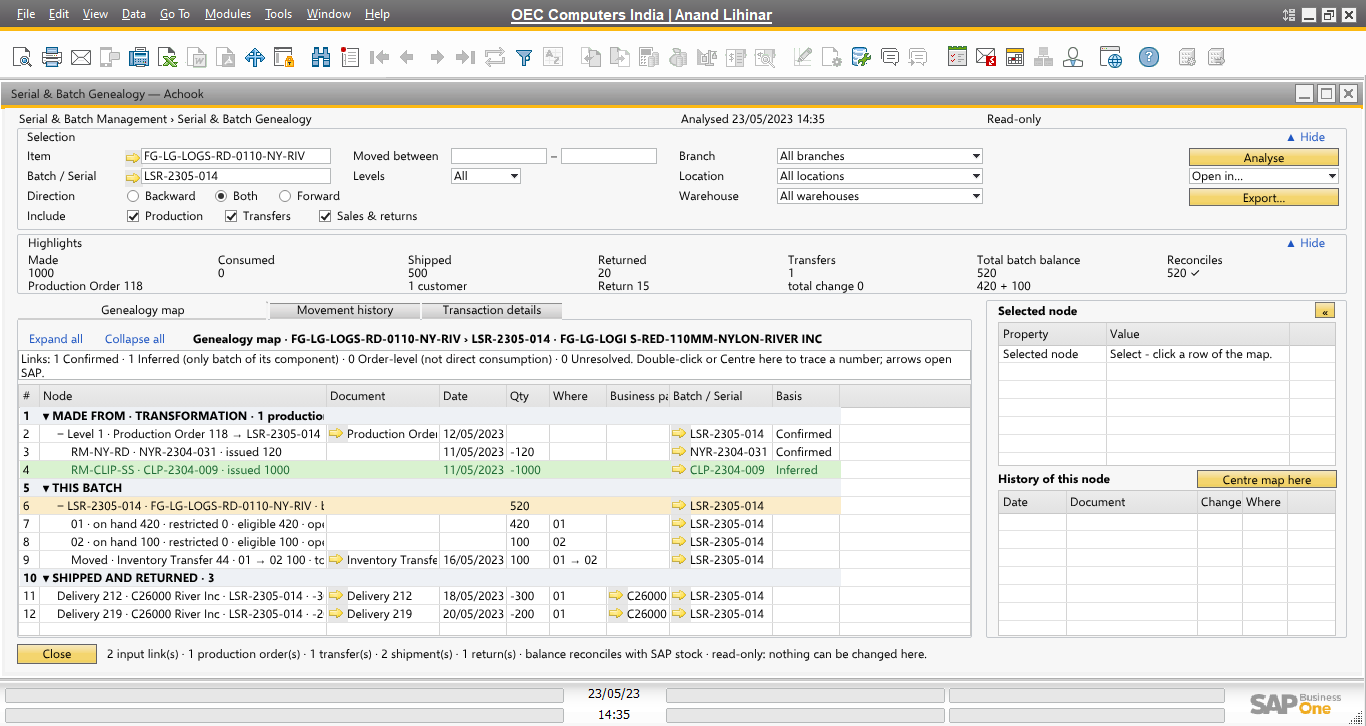
Genealogy relationship map
Follow a batch or serial forward and backward through documents, production and business partners, lane by lane, and re-centre the map on any related batch.
Recall Analysis
For a batch or serial, see where it was shipped between two dates, with reconciliation and a Contain preview.
Reservations
Reserve serials and batches for documents and business partners; see competing reservations and release or expire them.
Trigger Matrix and strategies
Choose when allocation runs and which strategy applies, per your configuration.
How TraceGuard works
- AllocateAllocation is simulated and applied through SAP’s standard batch windows.
- GovernStatus, expiry, QC and certificates are maintained with reasons.
- TraceGenealogy shows where every batch came from and went.
- RecallRecall Analysis identifies affected shipments in seconds.
 Interactive demo Walk through the whole lifecycle on real SAP Business One screens →
See it with your own data
A live demo in your SAP Business One version, with your item groups, business partners and batches.