

Clean item data from the very first entry
Every new item goes through rules you define: a code and description built from parameters, mandatory fields by item group, duplicate checks and approval routing. Only complete, unique, approved items reach SAP Business One’s Item Master Data.
Capabilities
Code and description built from parameters
A Recipe ID defines the parameters (category, family, colour, length, BP partner, artwork). The item code and description are generated from them, so every item follows one convention.
Duplicate check before the item exists
Check Duplicate compares the generated description with items in SAP and with open requests (draft, pending approval, rejected), shows a matching % and flags possible duplicates from your threshold.
Requests, not direct edits
Create New Item saves a request with a provisional code. Item Requests lists drafts, requests waiting for approval and rejections, with the reason.
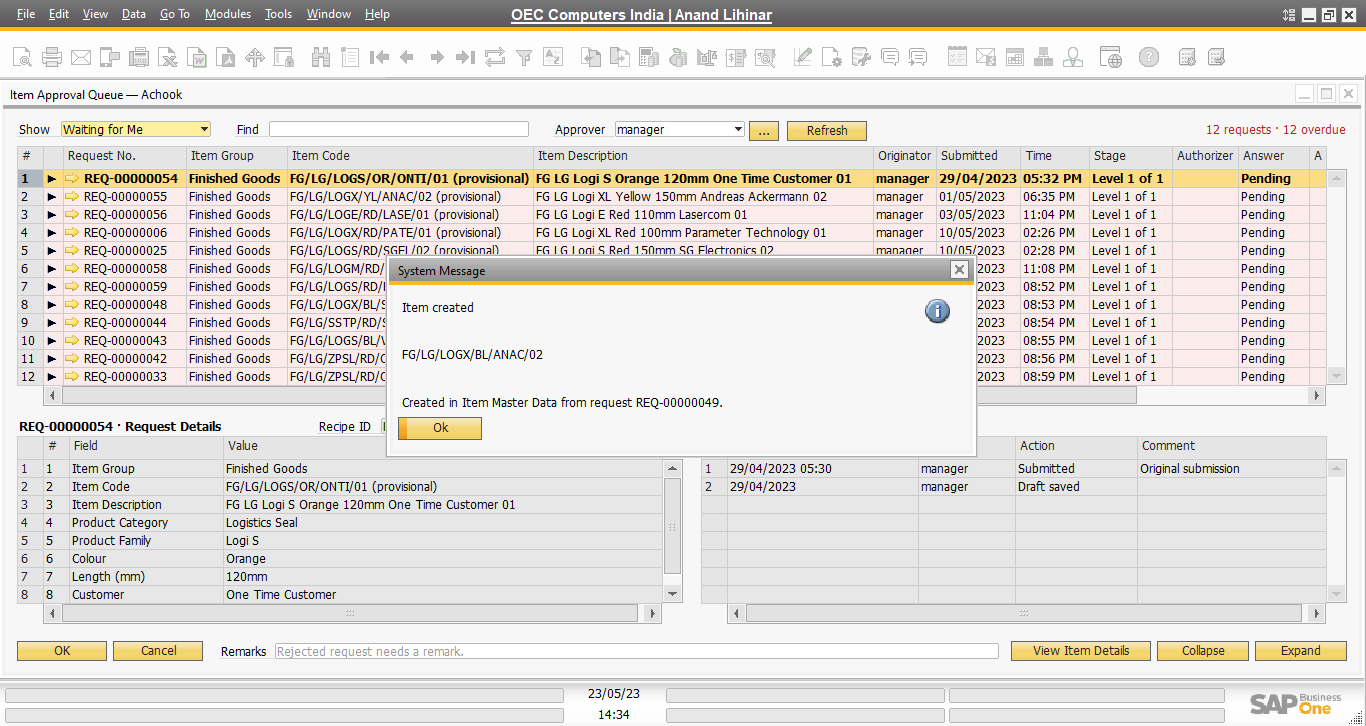
Approval queue with levels and due dates
Approvers see requests waiting for them with stage, due date and overdue count; Approved turns the row green, Rejected red, and a rejection needs a remark.
Created in SAP only after approval
On final approval the item is created in SAP’s Item Master Data with its final code; SAP’s own change log records it and the requester receives an SAP message.
Read-only while with the approver
A request that is with an approver opens read-only, so the approver always sees exactly what was submitted.
Correct and resubmit
A rejected request returns to its requester with the approver’s remark; Open & Correct reopens it, and Generate & Save sends it for approval again.
Audit and compliance controls
Every request shows who created it and when, its audit action, duplicate and keyword check results, in the Governance & Validation tab.
How ItemGuard works
- RequestThe requester creates the item from parameters; code and description are generated.
- CheckDuplicate and keyword checks run against SAP items and open requests.
- ApproveApprovers approve or reject in the Item Approval Queue, with remarks.
- CreateThe approved item is created in SAP Business One’s Item Master Data.
 Interactive demo Walk through the whole lifecycle on real SAP Business One screens →
See it with your own data
A live demo in your SAP Business One version, with your item groups, business partners and batches.